
Payroll is one of those processes where there's no room to wing it. Get it wrong and it's rarely just one annoyed employee. It's tax penalties, compliance headaches, and a client who stops trusting the system you built for them.
More US-based companies are turning to Odoo for a connected, single-platform ERP, and payroll is often one of the first modules that gets put through its paces. Before recommending it to a client, a few questions are worth answering up front:
- Which states are our employees actually based in?
- Are we doing any government or public-contract work?
- Does anyone on payroll also own part of the company?
Answering these early is usually what separates a smooth implementation from a mid-project surprise.
What Odoo US Payroll Handles Well
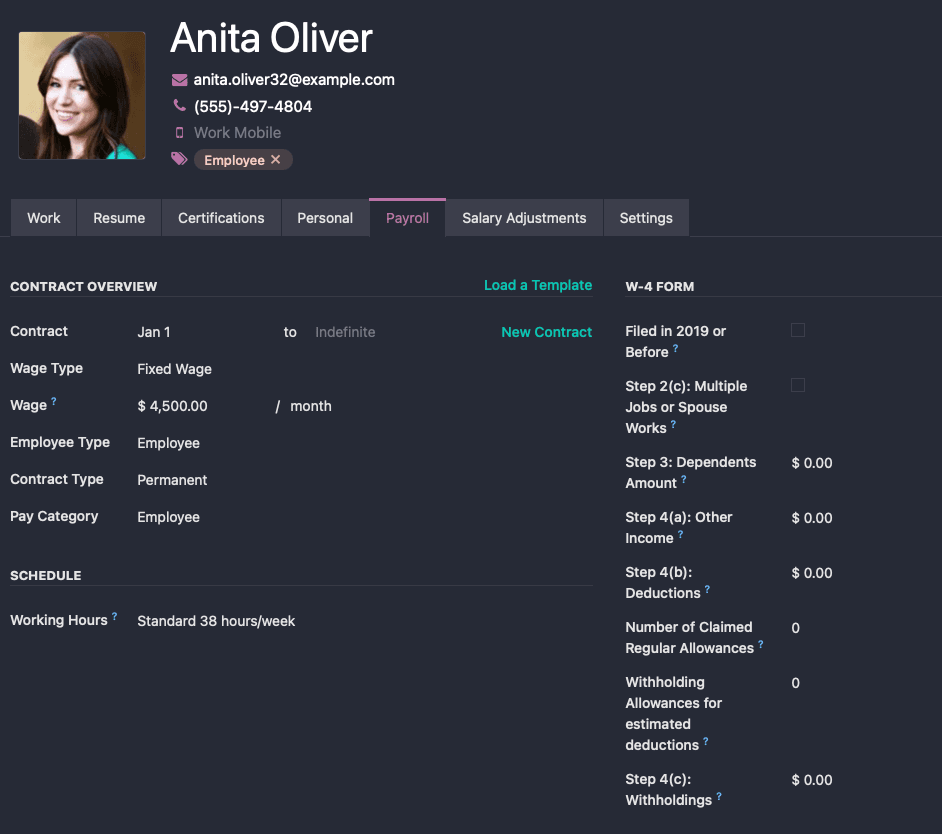
Almost everything traces back to the employee record. That's where the payroll team sets up:
- W-4 details: marital status, withholding allowances, extra withholding
- Wage type: salaried vs. hourly
- Contract classification: exempt vs. non-exempt
- Benefits: 401k with employer match, medical, dental, vision, FSA, dependent care FSA, commuter benefits, and Roth 401k
- Work entry source: working schedule or attendance-based
Salary structures group employees by how they're actually paid, and salaried and hourly populations are usually kept separate since they tend to run on different pay schedules. From there, a single Pay Run can process payslips for an entire structure at once instead of one employee at a time.
Hourly Pay and Attendance Integration
This is where things get genuinely useful. Hourly payroll connects directly to Odoo's Attendances app, including kiosk mode, a tablet mounted at the door where employees can clock in and out without ever logging into a computer.
Once that attendance data exists, Odoo takes over from there:
- Hours worked flow straight into the payslip
- Overtime gets calculated using configurable Overtime Rule Sets
- Missing data, like no SSN on file or no active contract, shows up as a warning before a pay run even starts
Overtime rules are configurable for good reason. They vary by state and federal law, and there's no single formula that works everywhere.
Native Accounting Integration
Every validated payslip generates a real journal entry, and each salary rule, whether it's a state tax line, a specific benefit, or a bonus, maps to its own debit and credit account.
That means gross wages, taxes, benefits, and net pay all land correctly in the company's actual books, with nobody re-typing numbers into a separate accounting system. If a journal entry doesn't balance, Odoo flags an adjustment line so the accounting team knows exactly where to look.
Payment Processing
Payments go out as a NACHA file, the standard U.S. format for electronic bank transfers. Generate it once, upload it to the bank, and an entire pay run processes in a single batch instead of transfer by transfer.
Tax Reporting
Odoo also generates the core U.S. payroll tax forms directly from the pay run data. The system produces CSV files for the W-2 (annual employee wage and tax summary), Form 941 (quarterly federal income and FICA taxes), and Form 940 (annual federal unemployment tax). There's also an ADP export, for companies that still run their actual filing through ADP but want Odoo to feed it clean data. These come out as files to submit through a third-party e-filing service rather than filed directly from Odoo, but the heavy lifting of compiling the numbers is already done.
Where Odoo US Payroll Still Falls Short
1 . Not Every State Is Covered Yet
State income tax rules are added state by state, and the list is still growing.
- How it works: Odoo 19.0 ships with 16 states supported (including California, New York, Texas, Florida, Colorado, Illinois, Virginia, Arizona, Oregon, and North Carolina), and version 19.3 adds five more: Georgia, Iowa, Mississippi, New Jersey, and Tennessee, for 21 in total. States like Pennsylvania, Michigan, Kentucky, Missouri, and Ohio aren't supported yet, with no committed date.
- Worth knowing: "Supported" and "has state income tax" aren't the same thing. States like Florida, Texas, Nevada, and Washington are in the localization but collect no state income tax at all, so there's simply nothing to configure there. Federal taxes (income, FICA, unemployment) are always covered, for every state.
- The Payroll Value: Before scoping any payroll project, check where the client's employees are actually located, whether each of those states is supported in the version being deployed, and whether the states in question even levy income tax in the first place.
2 . Prevailing Wage Isn't Built In
Prevailing wage, the legally mandated pay rate tied to certain government-funded and public works contracts, isn't part of the US payroll localization yet.
- How it works: This mostly matters for construction, contracting, and public-sector clients, and it comes up especially often in California.
- The Payroll Value: Is this client doing any work for a government agency or public contract, no matter how small the company? If so, this gap needs to be dealt with before go-live, not discovered after.
3 . Direct Deposit Isn't Fully Automated
- How it works: The NACHA file does most of the heavy lifting, but someone still has to manually upload it to the bank.
- The Payroll Value: True bank-to-bank automation is in development, just not live yet, so this is a manual step to plan for in any implementation timeline.
4 . No Self-Service Portal for Payroll
- How it works: Employees need a full paid Odoo license just to see their own payslip. Right now the workaround is emailing individual PDFs.
- The Payroll Value: Fine for a small team, but a real licensing cost once a client has a large hourly workforce.
5 . Highly Specific Tax Scenarios Need Custom Configuration
- How it works: S-corp shareholder-employees who own more than 2% of their company have unusual W-2 and 941 reporting requirements around health insurance premiums.
- The Payroll Value: Odoo's standard benefits setup won't catch this on its own. It takes a custom configuration, not a default toggle.
None of this makes Odoo's payroll module weak. For small and mid-sized businesses without a lot of complexity, it's a genuinely integrated system, and the native accounting connection alone is worth more than it might seem. Most competitors still make you stitch payroll and bookkeeping together yourself.
The difference between a smooth payroll implementation and a rocky one usually comes down to a few questions asked at the very start: which states are the client's employees based in, is there any construction or public-contract work involved, and does anyone on payroll hold significant ownership in the company. Ask these early, and most of the real risk shows up before it ever turns into a problem after go-live.